index


In-place conversion tool for an OSTree-backend bootc system (for example,
Bluefin) to a ComposeFS-backend bootc system (for example, Dakota). It keeps
/home, /var, and /etc customizations, flatpaks, container storage, and
user accounts.
Contribute compute — no code needed
Your machine runs one task at a time using your signed-in AI coding CLI. The relay alternates between eligible School (OS) and Reef (apps) hives after each task. If one hive has no work, the other can continue.
The guide covers prerequisites, verified just setup, credentials, provider
costs, and how to stop with Ctrl+C. Your subscription quota or API charges apply.
Never post account credentials or API keys in issues or pull requests.
Migrate Bluefin → Dakota (quick start)
The common case: Bluefin stable (btrfs) → Dakota stable. Five steps. Your old OSTree deployment stays in the boot menu as a fallback the whole time.
⚠️ Back up anything you can't afford to lose first. This rewrites how your system boots. It preserves
/home,/var,/etc, flatpaks, container storage, and user accounts — but treat it as risky until you've rebooted and confirmed everything works. It's reversible until you runcommit(step 5).
1. Get the migrator. Download the latest prebuilt binary. Use
x86_64-unknown-linux-gnu on x86_64, aarch64-unknown-linux-gnu on arm64
glibc systems, or aarch64-unknown-linux-musl on arm64 musl systems such as
postmarketOS and Alpine:
Release-naming note. The project changed its repository name from
bootc-migrate-composefstobootc-migrateafter v0.2.0.release.ymlpublishes under the new name, so from v0.6.0 the tarball, binary, and container image are allbootc-migrate. The commands below reflect that. To install the older v0.2.0 artifacts, substitutebootc-migrate-composefsin the paths.
curl -fsSL -o bmc.tar.gz \
  https://github.com/tuna-os/bootc-migrate/releases/latest/download/bootc-migrate-x86_64-unknown-linux-gnu.tar.gz
tar xzf bmc.tar.gz
sudo install -m755 bootc-migrate /usr/local/bin/bootc-migrate
sudo install -m755 bootc-rebase /usr/local/bin/bootc-rebase
On Bluefin LTS, /usr/local is part of the read-only /usr, so the
install commands fail. Run the binaries from the directory where you
unpacked them instead (sudo ./bootc-migrate …). Nothing later needs them on
PATH: the bootloader resync hook keeps its own copy under
/var/lib/bootc-migrate/bin.
…or pull the container image
A minimal image ships the same binary, useful when GitHub Releases is rate-limited/blocked, or to COPY --from= it into another Containerfile:
podman create --name bmc-extract ghcr.io/tuna-os/bootc-migrate:latest
podman cp bmc-extract:/usr/local/bin/bootc-migrate .
podman rm bmc-extract
sudo install -m755 bootc-migrate /usr/local/bin/bootc-migrate
…or build from source (needs Rust)
git clone https://github.com/tuna-os/bootc-migrate
cd bootc-migrate
cargo build --release
sudo install -m755 target/release/bootc-migrate /usr/local/bin/
2. Dry-run — makes no changes and checks that your system is ready:
sudo bootc-migrate \
  --target-image ghcr.io/projectbluefin/dakota:stable --dry-run
3. Migrate (~5–25 min):
sudo bootc-migrate \
  --target-image ghcr.io/projectbluefin/dakota:stable
4. Reboot — the new composefs entry is the default. If anything looks wrong, pick the old Bluefin / OSTree entry in the boot menu to get straight back.
sudo systemctl reboot
5. Confirm, then make it permanent:
grep -oE 'composefs(\.digest)?=[^ ]*' /proc/cmdline   # confirms composefs boot
sudo bootc-migrate commit                 # one-way; removes the OSTree fallback
⚠️ Note: Phase 4 copies
/varto the composefs side. After migration, the two/vartrees are independent. Changes on the composefs side do not appear if you roll back to OSTree. Commit only when you trust the new system.
That's it. For flags, rollback, recovery steps, and phase details, see
Usage — end-to-end walkthrough.
On Bluefin LTS (XFS) or systems with LVM / LUKS / a dedicated /var
partition, the tool handles those automatically — see
docs/filesystem-support.md.
Status: CI-validated, released, and tested on real hardware. Each push to
mainruns a round-robin slice of the gating E2E cells. The nightly run does all cells in.github/e2e-scenarios.yml. Prebuilt binaries are on the Releases page.
Interactive wizard (TUI)
Prefer a guided walkthrough? Run bootc-migrate with no --target-image
or with tui to open the terminal wizard. The wizard helps you select a target
image and options. It then shows the review and live phase logs:
sudo bootc-migrate tui
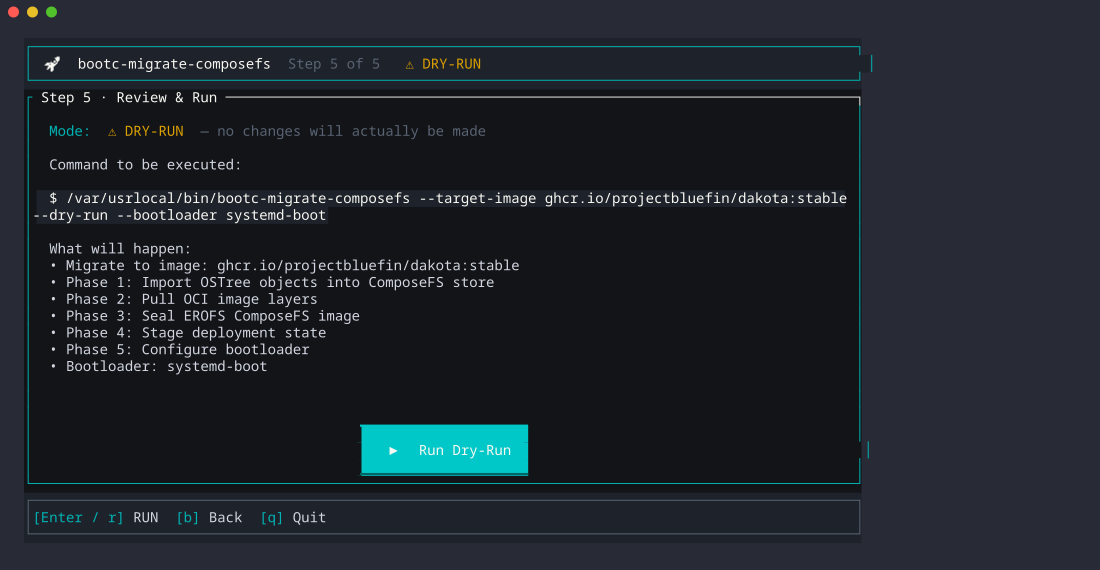
The image picker fetches the latest CI-published catalog, then uses a cached
or bundled JSON snapshot if offline. It lists published Bluefin, Universal
Blue, TunaOS, Zirconium, and Utah images. Utah is pre-alpha, so the picker
offers only its :testing tag. You see the selected image reference and backend before
you continue. OSTree targets use bootc-rebase, which you must install
alongside bootc-migrate; ComposeFS targets use the normal migrate path. The
tool does not support a return from ComposeFS to OSTree.
The wizard starts in dry-run mode. Press Enter to accept each screen, use ↑/↓
to choose an image, and press Space on the options page to change a setting.
For a live run, turn off dry-run there, or press Enter after a successful
dry-run to review and apply in the same session. The wizard then clears the
old confirmation and does the readiness checks again. The final review needs
CONFIRM and Enter before anything changes. You need root for a migration,
but you can browse the catalog without it.
Coming from a regular (non-bootc) install
Fedora, Ubuntu, Debian, and Arch installs use package managers such as rpm, dpkg, or pacman.
These systems are package hosts, not bootc deployments.
bootc-rebase detects the source and selects the package → OSTree route.
The TUI shows the same route, limits the image picker to OSTree targets, and keeps the run read-only.
Current status: preview only. The
PackageInstallengine does not exist yet (#373). Run the readiness preview, but do not treat it as a migration:
sudo bootc-rebase rebase \
  --target-image quay.io/fedora/fedora-bootc:latest \
  --target-backend ostree \
  --dry-run
The preview shows two reports. One covers the package host; the other covers target hardware.
It checks UEFI boot, the root filesystem and subvolume layout, LUKS/LVM, /boot,
/home, free space, active package transactions, and SELinux.
The support matrix records evidence for each source distribution, filesystem, and boot mode.
The completed route will use this contract:
- The bootc deployment carries user accounts, home directories, application data, and user-modified
/etcfiles. It uses the target image's default for unmodified package-owned configuration. - Host packages do not carry. The software report (#377) lists missing packages, third-party repositories, services, and kernel modules. It also lists Flatpak, Homebrew, toolbox/distrobox, or derived-image replacements.
- The old package OS stays bootable as Previous system until commit. #374 tracks creation and removal of that rollback entry.
- Use a separate one-way commit. After you verify the new deployment,
#378 guides commit and reclaims the old OS.
The existing
bootc-rebase commitsupports only composefs → OSTree. Do not use it for the package-host route.
Architecture
flowchart TB
%% ── Source: what we migrate from ────────────────────────────
subgraph SRC["Source · OSTree-backed Bluefin"]
direction TB
S_USR["<b>/</b> — OSTree hardlink farm<br/>/usr/etc · /ostree/repo object store"]
S_ETC["<b>/etc</b><br/>live, 3-way-merge source"]
S_VAR["<b>/ostree/deploy/<n>/var</b><br/>user state"]
S_BOOT["<b>/boot/loader/entries</b><br/>GRUB BLS · ostree-*"]
end
%% ── The migration tool: six phases, one command ─────────────
subgraph BIN["bootc-migrate · 6 phases (0–5)"]
direction TB
P0["<b>Phase 0 · Preflight</b><br/>ESP size · NVRAM · reflink"]
P1["<b>Phase 1 · OSTree import</b> (optional)<br/>reflink objects → composefs store"]
P2["<b>Phase 2 · OCI pull</b><br/>target image → composefs store"]
P3["<b>Phase 3 · EROFS seal</b><br/>build · seal · capture config digest"]
P4["<b>Phase 4 · Stage deploy</b><br/>3-way /etc merge (sealed mount)<br/>symlink prune · identity-DB union<br/>/var copy · .origin (tini)"]
P5["<b>Phase 5 · Bootloader</b><br/>sd-boot from sealed mount<br/>BLS entries on ESP · NVRAM"]
P0 --> P1 --> P2 --> P3 --> P4 --> P5
end
%% ── Target: what we migrate to ──────────────────────────────
subgraph DST["Target · ComposeFS-backed Dakota"]
direction TB
D_CFS["<b>/composefs/</b><br/>images/ (EROFS) · objects/ · streams/"]
D_STATE["<b>/state/deploy/<verity>/</b><br/>etc/ · <verity>.origin"]
D_VAR["<b>/state/os/default/var</b><br/>bind-mounted as /var by initramfs"]
D_BOOT["<b>/EFI/Linux/bootc_composefs-<verity>/</b><br/>vmlinuz · initrd<br/>/loader/entries/*.conf · systemd-bootx64.efi"]
end
%% ── Data flows across the lanes ─────────────────────────────
S_USR -- "ostree object reflinks" --> P1
P2 --> D_CFS
S_ETC -- "current / old / new merge" --> P4
P4 --> D_STATE
S_VAR -- "verbatim copy<br/>(containers · flatpaks · machine-id)" --> D_VAR
P3 -- "sealed config digest<br/>(not rootfs verity)" --> P4
P3 --> P5
P5 -- "copy from sealed mount" --> D_BOOT
P5 -. "efibootmgr · Linux Boot Manager" .-> NVRAM(["UEFI NVRAM"])
RUN["<b>Booted Dakota</b><br/>/ = composefs overlay (RO)<br/>/etc writable ← state/<br/>/var writable ← state/os/default/var"]
DST -. "reboot → systemd-boot → kernel<br/>cmdline composefs=<verity>" .-> RUN
%% ── Lane colours ────────────────────────────────────────────
classDef src fill:#e3f0ff,stroke:#3b82c4,color:#0b2545;
classDef bin fill:#fff4e0,stroke:#d9920b,color:#5a3a00;
classDef dst fill:#e4f7e7,stroke:#3ca34a,color:#06311a;
classDef run fill:#f3e8ff,stroke:#8b5cf6,color:#2e1065;
class S_USR,S_ETC,S_VAR,S_BOOT src;
class P0,P1,P2,P3,P4,P5 bin;
class D_CFS,D_STATE,D_VAR,D_BOOT dst;
class RUN,NVRAM run;
Key insight: Phase 3 runs bootc internals cfs oci seal and prints the
sealed manifest's config digest. Phases 4 and 5 pass that sealed config
digest (not rootfs verity) to bootc cfs oci mount. The overlay exposes
/etc, kernel, initrd, systemd-boot, and kernel modules without another OCI
layer stream.
What it does
Six phases (numbered 0–5 to match console output), run as one command:
- Phase 0 — Preflight — free-space, reflink/CoW, UEFI, NVRAM-writable, ESP capacity.
- Phase 1 — OSTree import (optional) — copies file objects from OSTree
into the composefs store. This reduces duplicate data in Phase 2. Skip it with
--skip-import. - Phase 2 — OCI pull —
bootc internals cfs oci pullof the target bootc image into the composefs store. - Phase 3 — EROFS seal — builds and seals the EROFS image. It saves the sealed config digest for Phases 4 and 5.
- Phase 4 — Stage deploy — merges
/etcand combines lines from identity databases. It reads from the sealed mount and removes broken/usr/*symlinks. It keeps/home↔/var/homecompatibility and preserves/var..originstoresboot_digestandmanifest_digest;tiniwrites it. - Phase 5 — Bootloader — copies
systemd-bootx64.efifrom the sealed mount to the ESP. It confirms that current wireless devices work with the target kernel. It writes BLS entries and adds a stateroot mount argument for dedicated/var. It registersLinux Boot Managerin UEFI NVRAM. The original GRUB entry stays as a rollback escape hatch.
After a successful reboot into the composefs entry, bootc-migrate commit removes the OSTree fallback and makes composefs permanent.
Usage — end-to-end walkthrough
Before you start. This tool changes bootloader state and copies or reuses all of
/var. Don't run it on a machine you can't reinstall in a pinch. Until you runcommit, it's reversible — but a fresh backup is still cheap insurance.
1. Decide your target
The migration takes a --target-image — the composefs-backed bootc image
you want to end up on. Today the validated path is Bluefin → Dakota:
ghcr.io/projectbluefin/dakota:stable # default target
For other OSTree systems (Aurora, Silverblue), set --target-image to the
composefs equivalent.
Utah on OSTree → Utah on composefs. Utah ships systemd-boot and the composefs initramfs module of bootc. Thus a Utah install that boots OSTree can change to the composefs backend with the image that it runs now. The OS stays the same; only the backend and the bootloader (GRUB → systemd-boot) change:
sudo bootc-migrate --target-image ghcr.io/projectbluefin/utah:testing --dry-run
sudo bootc-migrate --target-image ghcr.io/projectbluefin/utah:testing
On such a host, sudo bootc-migrate tui offers this conversion as the
first choice. Utah is pre-alpha, and its utah -> utah cell (btrfs on
LUKS) is non-gating.
⚠️ Not on btrfs until the target's kernel has the btrfs fs-verity fix.
On btrfs, kernels from 7.2 on can reject data that is correct (
fs-verity ... FILE CORRUPTED!indmesg). The composefs store is fs-verity data. The first local run of the cell stopped at the integrity check before it staged anything. A host that gets past the check can still readEIOfrom its root later. The fix is linux-nextdcf8811f63af; Utah plans to ship Fedora's kernel rebuilt with it. Details and measurements are in docs/support-matrix.md.
The target must share a base lineage with the source: its ID_LIKE must
overlap yours, or both images must ship the same package manager. Bluefin,
Silverblue and CentOS-based images are all one dnf family. The tool
refuses a target from another family, for example Fedora → openSUSE,
because the standard /etc merge would carry your Fedora configuration
onto openSUSE. Pass --accept-cross-base to migrate with the cross-family
/etc policy instead. See "Cross-family targets" below.
To migrate to an image you built yourself instead of a published one, see docs/local-images.md. Serve it from a registry the machine can reach. An image that exists only in podman storage is not enough. The capability scan and the Phase 4/5 fallbacks read the target over the registry API.
2. Check readiness with a dry-run
sudo bootc-migrate \
  --target-image ghcr.io/projectbluefin/dakota:stable \
  --dry-run
Things to confirm in the report:
Booted bootc backend: ostree— the conversion runs from here.composefsmeans the conversion is done, and the tool swaps the deployment image instead (bootc switch). Onlynone(not a bootc deployment) is a blocker.UEFI Boot Mode: Yes+NVRAM writable: Yes— required for the systemd-boot path; on BIOS-only or locked NVRAM pass--bootloader grub2.ESP Free Space: ≥ 150 MB— we copysystemd-bootx64.efifrom the target image onto the ESP.Reflink (CoW) Support: Yes— btrfs and XFS both support reflink.ComposeFS free spaceincludes the source OSTree import. It also includes two expanded copies of the target image for ComposeFS and podman fallback storage. Another 5 GiB provides temporary headroom for the initrd rebuild.
Optionally, preview what Phase 4's /etc merge will see before you run it:
sudo bootc-migrate etc-drift
Lists every path where your live /etc has diverged from the OSTree factory
default (added/modified/removed/type-changed), read-only. Useful to find
stale customizations you do not need before they carry forward into the
migrated system.
3. Run the migration
sudo bootc-migrate \
  --target-image ghcr.io/projectbluefin/dakota:stable
Expect ~5–10 minutes on warm caches, ~15–25 minutes on a cold pull. Six phase headers (0–5) print as it goes:
| Phase | What's happening | Why it might take a while |
|---|---|---|
| 0 — Preflight | Same checks as --dry-run | seconds |
| 1 — OSTree import (optional) | Reflinks existing OSTree file objects into the composefs object store so Phase 2 mostly dedups | tens of seconds to a few minutes; skip with --skip-import |
| 2 — OCI pull | bootc internals cfs oci pull of the target image | minutes (network-bound) |
| 3 — EROFS image | Builds + fs-verity-signs the composefs metadata image | seconds |
| 4 — Stage deploy | 3-way /etc merge (from sealed mount) or, across families, the cross-family policy; dangling-symlink prune, identity-DB line-union, /var copy or dedicated-subvolume preservation, .origin file written | ~1 minute |
| 5 — Bootloader | Copies systemd-boot from mounted image, writes BLS entries, registers NVRAM | ~30s |
When it ends with === MIGRATION COMPLETED === the on-disk state is
ready. Reboot:
sudo systemctl reboot
4. Validate the composefs boot
Log in (your existing accounts and SSH keys still work) and check:
cat /proc/cmdline                                       # must contain composefs=<hex>
bootc status                                            # should report the composefs deployment
bootc status --json | jq .status.booted.composefs        # non-null
Spend a day on it. Run your usual workflow — flatpaks, dnf, containers,
homebrew, GNOME extensions, whatever. Everything that lived under /home,
/var, and /etc on Bluefin should be where you left it. If something
is missing or broken, you can roll back (see below).
A login banner (/etc/motd.d/85-bootc-migrate) reminds you to run
commit on every login until you do, so a live migration doesn't sit
forgotten in this dual-boot state indefinitely. It clears itself once
commit runs — or once undo runs, since at that point there's nothing
left to commit.
5. Make it permanent (one-way)
Once you trust the new system:
sudo bootc-migrate commit
This removes the OSTree fallback from the ESP, drops GRUB2 boot artifacts, and reclaims ~14 GiB of OSTree object store. The systemd-boot entry becomes the sole default with timeout 0.
Flags
| Flag | Purpose |
|---|---|
--dry-run | Print every action; touch nothing |
--skip-import | Skip phase 1 (faster when target image is mostly new content) |
--bootloader grub2 | Stay on GRUB2 instead of installing systemd-boot |
--skip-preflight | Bypass preflight checks (don't, unless you know exactly why) |
--force | Proceed past non-fatal warnings |
--accept-cross-base | Migrate to a target from another OS family with the cross-family /etc policy (see below). --force does not imply it |
--accept-hardware-gaps | Migrate although the hardware check (see below) expects hardware that works today to stop working. --force does not imply it |
Hardware and firmware check
The target image replaces your kernel, its modules and your firmware. Before
the tool changes anything, it compares your hardware with the target. The
bootc-rebase scan <image> command shows the same report.
The tool examines the PCI, USB, SDIO, virtio and HID devices. It examines only the devices that use a loadable kernel module now. It does these checks:
- Drivers. The target must ship the same module, or a module that claims the device.
- Out-of-tree drivers. These are drivers like NVIDIA, VirtualBox and
ZFS. The target can omit one of them. Then the report names the in-kernel
driver that replaces it (for NVIDIA,
nouveau) and what you lose. - Firmware. For each module, the tool lists the firmware files that your machine has. The target must ship at least one of them.
- CPU microcode. Your machine can have microcode updates for its CPU. Then the target must also have them.
Each result has a level:
[BLOCKING]: the tool refuses to migrate. A storage, display, network, wireless or USB controller loses its driver or all of its firmware. Or an out-of-tree driver has no in-kernel replacement. To continue anyway, use--accept-hardware-gaps. A better fix is an image variant that supports the hardware, for example an-nvidiaimage.[WARNING]: something can stop, but the migration continues. A display controller without its driver is a warning when the target kernel has a firmware framebuffer driver (simpledrm,efifb). The screen then works, but without graphics acceleration and at the firmware resolution.[note]: information only.
When the tool cannot read the target image, it tells you and continues. In this case, it did not check your hardware. Some image layers can be unreadable. Then no result blocks the migration, because the missing data can hide what the image ships.
Cross-family targets
bootc-migrate reads the target image's os-release and package manager
before it stages the image. Shared ID/ID_LIKE values or the same package
manager mean one family. Different families (Fedora → openSUSE or Debian) refuse.
If the target has no known package manager, the tool warns and checks the
staged os-release again.
With --accept-cross-base, the conversion route and both bootc switch routes
apply this policy:
- Target files win. The tool drops the vendor-only files of the source.
- Machine state and user-added files stay.
- For identity merges, target IDs come first and source accounts append. The
tool remaps the ownership of files in
/var. - Displaced edits use
<path>.rebase-old. The tool deletes no files. OstreeDeployapplies after OSTree finalization and schedules/.autorelabelwhen needed.ImageSwapapplies after composefs finalization and preserves sysusers/ldconfig repair.
If the staged image is cross-family without --accept-cross-base, the route
leaves it staged and unfinalized. Remove it before you try again. Do not reboot.
The tool prints the report and keeps it across the reboot. A composefs
deployment stores it at
/sysroot/state/deploy/<verity>/bootc-migrate-cross-family-report.json.
The composefs → OSTree route stores it in the new stateroot's
/var/lib/bootc-rebase/bootc-migrate-cross-family-report.json, because an
OSTree deployment root is immutable after installation. Non-gating E2E cells
test the conversion route and OstreeDeploy. See ROADMAP.md and issues
#258,
#256, and
#259.
Move system Steam into Flatpak Steam
After you install and run com.valvesoftware.Steam once, its per-user
data can absorb a system Steam install without new game downloads:
bootc-migrate system-to-flatpak-steam --dry-run
bootc-migrate system-to-flatpak-steam
Run it as the desktop user, without sudo, after you close Steam and all
Steam games. The tool uses filesystem renames only to move steamapps, userdata,
and config from ~/.local/share/Steam into Flatpak Steam directories.
The tool keeps existing Flatpak versions and library registries in a
timestamped rollback directory under ~/.var/app/com.valvesoftware.Steam/.
The command keeps runtime files for Steam and folders like ~/Games.
Add a Flatpak filesystem override for ~/Games separately if Steam shortcuts need it.
Rollback / recovery
Until you run commit, the migration is reversible. The previous OSTree
deployment stays bootable:
- Phase 5 only adds the systemd-boot composefs entry; it never deletes the
existing
/boot/loader/entries/ostree-*.conffiles. - The original
/ostree/deploy/<n>/deploy/<commit>.0/rootfs and/ostree/deploy/<n>/var/stay on disk. - Phase 4 copies
/varor reuses it in place. The migration does not delete original data. - The tool pushes
Linux Boot Managerto the front of NVRAMBootOrder. TheFedorashim entry remains listed.
Automatic rollback subcommand
To return to the original OSTree deployment with the command line:
sudo bootc-migrate rollback --reboot
# or via the universal re-base CLI:
sudo bootc-rebase rollback --reboot
This verifies prerequisites, re-orders UEFI BootOrder so the OSTree entry (Fedora/GRUB) takes top priority, and reboots immediately into the OSTree deployment.
Manual firmware recovery
If the system fails to boot into composefs or NVRAM state breaks:
- Power on; tap the firmware boot-menu key (commonly F12, F8, or Esc).
- Pick the
Fedoraentry. GRUB will show the originalostree:0menu. - Boot it. You land on the pre-migration system with its
/varand/etcintact.
From a booted composefs session, run:
sudo efibootmgr -v | grep -E 'Fedora|Linux Boot Manager'
sudo efibootmgr --bootnext <Boot####-of-Fedora>
sudo systemctl reboot
The tool writes diagnostic snapshots and logs under /var/log/bootc-migrate/ on
every run (preflight-*.json and migration.log). You can reconstruct boot
settings if NVRAM is lost.
After bootc-migrate commit runs, the tool removes the OSTree fallback from
the ESP. The E2E test exercises the full round-trip (composefs → OSTree → composefs)
on every run.
First-boot repair
The migration stages a unit that runs one time on the first boot. It fixes
these known problems: carried home files with the wrong owner or time, a
duplicated machine-id, broken Flatpak installations, and SELinux labels.
Other findings stay as they are; the repair log reports them. To stop the
repair, run sudo bootc-migrate repair --disable before the reboot. See
docs/first-boot-repair.md.
What's preserved
Validated end-to-end (21+ assertions per run; see tests/run-e2e.sh):
- /var data —
/var/lib/*,/var/log/*,/var/cache/*, containers, flatpak system installs, machine-id, hidden dirs and symlinks. - User homes —
/var/home/<user>/, dotfiles, project trees, SSH keys, wallpapers, extensions, dconf user db, and flatpak installs. When an OSTree source uses/home -> /var/home, a bind mount keeps paths valid. - /etc state —
/etc/sudoers.d/*,/etc/hostsedits, customsshd_config.d/*, custom config files in/etc/, edits to/etc/hostname, and/etcsymlinks. - Accounts —
/etc/passwd,/etc/shadow, and/etc/groupline-union merged so existing users survive and the tool adds new system users (messagebus, polkitd).
What's intentionally not carried forward:
- OSTree/rpm-ostree state markers (
.updated,.rpm-ostree-shadow-mode-fixed2.stamp) - GRUB2 config files (
grub2.cfg,grub2-efi.cfg,/etc/grub.d/) — the target uses systemd-boot - Source-image
/etcfiles the target image removed (e.g.sshd_config.d/40-redhat-crypto-policies.confwhich references/etc/crypto-policies/paths Dakota doesn't ship)
Troubleshooting
| Symptom | Likely cause | Fix |
|---|---|---|
| Phase 0 refuses with "System is not booted into a bootc deployment" | Neither an ostree nor a composefs deployment is booted | Nothing to migrate from; check bootc status |
| Phase 0 refuses with insufficient free space | The root cannot hold the source import, ComposeFS target, podman fallback copy, and initrd rebuild headroom | Free space or grow the partition, then rerun |
Post-reboot cat /proc/cmdline shows ostree= not composefs= | Firmware ignored the new NVRAM entry, or OVMF loaded Fedora\shim instead | Use firmware boot menu to pick Linux Boot Manager; if that fails, fall back to OSTree and report the firmware quirk |
bootc status says "No manifest_digest in origin" | You're on an old build of this tool | Update to main — version info is on the first line of the migration log |
| SSH key auth broken post-migration | Permissions changed during /var copy | Boot OSTree fallback and chmod 700 ~/.ssh; chmod 600 ~/.ssh/authorized_keys |
| GNOME boots but session settings (wallpaper, accent) look wrong | dconf database needs recompile | dconf update as your user, or log out + back in |
| Phase 5 refuses because the target kernel has no module alias for a wireless device | The image omits the driver for Wi-Fi hardware present on the source system | Fix or update the target image. Use --force only when alternate networking is available and losing Wi-Fi is acceptable |
| Refused with "hardware that works on this machine today is expected to stop working" | The target image does not ship a driver or firmware that your storage, display, network or wireless hardware uses, or an out-of-tree driver such as NVIDIA | Read the [BLOCKING] lines. Pick an image variant that supports the hardware, or re-run with --accept-hardware-gaps to accept the loss |
| Refused with "Cross-family re-base detected" | The target's ID_LIKE shares nothing with the host's and its package manager differs | Re-run with --accept-cross-base to use the cross-family /etc policy, or pick a target from the same family |
The new image boots, but /etc still looks like the old distribution | A cross-family migration ran with a build that predates #256 | Update the tool, boot the OSTree entry, and migrate again with --accept-cross-base |
| Phase 2 fails with "podman could not refresh" on your own image | The machine cannot pull the image, or podman rejects a plain-HTTP registry | Mark the registry insecure and confirm with a manual podman pull — see docs/local-images.md |
| Migration went wrong and you want to undo it | Something failed mid-migration | Run sudo bootc-migrate undo (removes composefs boot artifacts, keeps object store) or sudo bootc-migrate undo --full (full cleanup including object store); then reboot into OSTree |
Requirements
- Booted on an OSTree-backed bootc system (Bluefin, Aurora, Silverblue…)
- UEFI firmware with writable NVRAM (for the systemd-boot path; GRUB2 fallback works on BIOS)
- Btrfs or XFS sysroot with reflink/CoW support
- ESP with ≥150 MB free
- ≥
1.1 × ostree_repo_sizefree on/sysroot/composefs(no reflink: 1.5×) - Outbound registry access for
bootc internals cfs oci pull. (Phase 2 fetches the target image. Later phases read artifacts from the mount.) A local registry works too — see docs/local-images.md.
Building
cargo build --release
Drops a single binary at target/release/bootc-migrate.
Needs Rust 1.85+ and a Linux host with libxkbcommon-dev.
End-to-end tests
A QEMU-based E2E harness lives in tests/run-e2e.sh. It installs an
OSTree/ComposeFS base image with bootc. In E2E_MODE=package-install, it boots
an official cloud disk from Fedora or Ubuntu. tests/package-base.sh prepares
that disk. The harness runs the package → OSTree migration, reboots, and
validates the target plus its Previous system entry.
sudo ./tests/run-e2e.sh
Overridable via env: BASE_IMAGE, TARGET_IMAGE, DISK_SIZE,
FILESYSTEM, E2E_MODE, E2E_PACKAGE_BASE, and
E2E_PACKAGE_CROSS_FAMILY.
The full matrix is authoritative in .github/e2e-scenarios.yml. The nightly
schedule runs alternate cells, so each cell runs every other night. Each PR
and push to main runs a round-robin slice of the gating cells (see the
test guide):
| Cell | Base → target | Filesystem | Disk |
|---|---|---|---|
| composefs migration | bluefin:stable → dakota:stable | btrfs | 60G |
| composefs migration | bluefin:lts → dakota:stable | ext4 | 60G |
| composefs migration | bluefin:lts → dakota:stable | xfs+crypt | 60G |
| composefs migration | bluefin:lts → dakota:stable | xfs+lvm+crypt | 60G |
| ostree re-base | bluefin:stable → dakota:stable | btrfs | 40G |
GRUB2 → systemd-boot trial (bootloader-trial) | bluefin:lts → dakota:stable | xfs+crypt | 60G |
| ostree re-base, GNOME→KDE (non-gating) | bluefin:stable → aurora:stable | btrfs | 40G |
| TUI-driven migration | bluefin:stable → dakota:stable | btrfs | 60G |
| cross-family ostree re-base (non-gating) | bluefin:stable → bootcrew/opensuse-bootc:latest | btrfs | 40G |
| cross-family migration (non-gating) | bluefin:stable → bootcrew/opensuse-bootc:latest | btrfs | 60G |
| cross-family migration (non-gating) | bluefin:stable → bootcrew/debian-bootc:latest | btrfs | 60G |
| cross-family migration (non-gating) | bluefin:stable → bootcrew/ubuntu-bootc:latest | btrfs | 60G |
| cross-family migration (non-gating) | bluefin:stable → bootcrew/arch-bootc:latest | btrfs | 60G |
| composefs → ostree (non-gating) | dakota:stable → fedora-bootc:44 | btrfs | 40G |
| composefs → ostree, fault after ESP wipe (non-gating) | dakota:stable → fedora-bootc:44 | btrfs | 40G |
| composefs → ostree, fault before BootNext (non-gating) | dakota:stable → fedora-bootc:44 | btrfs | 40G |
| composefs → ostree, Dakota → Utah (non-gating) | dakota:stable → utah:testing | btrfs | 80G |
| composefs image swap (non-gating) | dakota:stable → utah:testing | btrfs | 40G |
| ostree → composefs, Utah → Utah (non-gating) | utah:testing → utah:testing | btrfs on LUKS | 60G |
| cross-family image swap (non-gating) | tunaOS marlin:gnome → utah:testing | btrfs | 60G |
| composefs → ostree, Marlin → Utah (non-gating) | tunaOS marlin:gnome → utah:testing | btrfs | 80G |
tunaOS desktop ring, ostree re-base with --de-migrate (4 cells, non-gating) | albacore gnome → niri → cosmic → xfce → gnome | btrfs | 40G |
| package install (exploratory) | Fedora Cloud → fedora-bootc:43 | btrfs | 40G |
| package install (exploratory) | Fedora Workstation → Bluefin | btrfs + separate /boot | 60G |
| package install (exploratory) | Ubuntu Cloud → fedora-bootc:43 (cross-family) | ext4 | 40G |
Of the composefs migration cells, only the two xfs* cells exercise the
ext4-loopback composefs store (XFS has no fs-verity); btrfs and ext4 seal in
place.
Layout
A Cargo workspace with three crates (see ROADMAP.md):
crates/bootc-migrate-core— capability library: phases, preflight checks,/etcmerge (mergetc), OSTree scans, stream extraction, transactions, capability scans, UID remaps, UEFI audits, and desktop migrations.crates/bootc-migrate— the protected MVP binary described above. CLI surface (clap),commit/undo/rollbacksubcommands, the TUI wizard. Its E2E cells are untouchable regression gates — this binary's behavior doesn't change as new capability lands inbootc-rebase.crates/bootc-rebase— the universal binary for re-base; see below.tests/run-e2e.sh— QEMU E2E harness that tests both binaries.
bootc-rebase — the universal re-base engine
bootc-migrate above does one proven thing: OSTree → ComposeFS.
bootc-rebase is the general tool. It provides a table over
backend × strategy to cover re-base scenarios
(same-backend image swaps, cross-backend conversions, bootloader changes,
cross-distro-family moves, desktop-environment switches). It's newer and less
battle-tested than the MVP binary; treat subcommands marked skeleton or
read-only below as previews, not yet full features.
cargo build --release -p bootc-rebase
| Subcommand | What it does | Status |
|---|---|---|
scan <image> | Registry-streamed capability probe of a target image — composefs/ostree readiness, fs-verity requirement, transient root/etc, bootloader payload, desktops, base OS identity, sysusers, initramfs flavor, filesystem expectation, and a Compatible: YES/NO verdict with reasons. On a package host it also prints a host overview (distribution and family, package manager and count, filesystem layout, boot mode, Secure Boot and SELinux — #371) and compares installed software with the target image. --json includes the host overview and software report for machine consumers. | Done |
rebase --target-image <image> | Re-base the running system, routing on --source-backend/--target-backend through the strategy table below. --plan prints the route, selected phases, and bootloader policy, then exits without touching the system. | Implemented for ostree→composefs (the MVP pipeline), composefs→composefs (image swap), ostree→ostree (native bootc switch, with cross-base UID/GID remap when host and target disagree on distro family — pass --accept-cross-base to proceed past the report), and composefs→ostree (OstreeInstall, #260: the target's own bootc install to-existing-root builds an OSTree deployment beside the composefs root; /etc merged, /var copied, composefs ESP artifacts restored and its firmware entry kept first as rollback; a durable transaction journal verifies ESP/NVRAM state and uses one-shot BootNext for the target until commit; exploratory, non-gating cells). --accept-cross-base also accepts a cross-family target on all three migration routes and selects the cross-family /etc policy (#256/#259) |
rollback [--reboot] | Re-order UEFI BootOrder back to the previous deployment. | Done |
undo [--reboot] | Make the staged package-host Previous system entry the bootloader default without removing the new bootc deployment. --dry-run prints the exact action. | Core rollback support is implemented for the snapshot produced by PackageInstall; engine wiring is tracked separately in #373 |
boot-entries [--json] [--interactive] [--rename-branding] [--apply] [--undo] | Enumerate and classify UEFI boot entries: dead (loader path missing), generic-label, duplicate, firmware-managed, plus which are protected and why. Dry-run by default — a bare invocation is the read-only audit. --interactive opens a checklist (protected entries are unselectable), --rename-branding proposes renaming the booted entry to PRETTY_NAME, --apply writes the result to NVRAM after a typed confirmation and a restorable snapshot, and --undo replays that snapshot. | Audit and the cleanup planner are unit-tested (protections, the last-bootable-entry guard, and the "every entry looks dead ⇒ the ESP is wrong" refusal). The gating OSTree re-base E2E cell also renames a live OVMF NVRAM entry, applies the plan, undoes it, and asserts byte-identical efibootmgr -v output. This covers the executor and snapshot restore; it does not cover the separate, unimplemented GRUB2→systemd-boot flip (#31, #189) |
commit [--apply] [--yes] [--force] | After a composefs → ostree re-base has booted, remove the composefs state it kept as rollback (#315). Dry run by default: checks that the system booted the OSTree deployment the install report names, that the ESP snapshot and a shim/GRUB firmware entry exist, and that every path of the old /var is present in the live /var. It then lists every path it would delete, with sizes. --apply deletes after a typed confirmation. It first requires the boot transaction to classify as complete, promotes the observed-good target entry in UEFI BootOrder, and records that promotion. Then it copies the install report and ESP snapshot into the live /var/lib/bootc-rebase and removes the old /var, the composefs store and the composefs deployments. It never modifies the OSTree repo, /boot or the ESP. --force accepts failed cleanup checks, but never an unobserved boot transaction, a composefs boot, or a filesystem mounted inside a path to delete. | Unit-tested against a fixture physical root. The non-gating composefs → ostree cell runs the dry run, then --apply, observes target-first BootOrder, then reboots and checks system health |
de-migrate stash|restore | Move a user's desktop-environment config (GNOME dconf/gnome-shell, KDE kdeglobals/plasma, COSMIC, niri, XFCE) into or out of a stash directory around a cross-DE re-base — union of paths per issue #68, never deletes. --run-hooks executes pre-switch.d/post-switch.d scripts with REBASE_FROM_DE/REBASE_TO_DE/REBASE_STASH_DIR/REBASE_HOME set. --dry-run previews without touching anything. | Done. Also runs automatically inside rebase --de-migrate; this subcommand remains the manual escape hatch for images shipping several desktops (which detection refuses to guess between) |
rebase --de-migrate | Detects the desktop environment the target image ships (registry-streamed session files, session binaries, and display-manager default session — no podman pull) and the one this host runs. When they differ, stashes every human account's outgoing DE config before staging and re-exposes any stash a previous re-base in the other direction left behind, running the pre-switch.d/post-switch.d hooks around each. | Done, unit-tested; off by default — a re-base never touches per-user desktop state unless asked to. The non-gating Bluefin→Aurora E2E cell passes --de-migrate, seeds GNOME config, and asserts that the cross-DE plan and stash are created. Because target desktop detection uses the registry scan, this evidence depends on that exploratory cell completing successfully (#68, #188) |
migrate-bootloader --to systemd-boot [--promote|--undo] [--from-image <image>] | GRUB2 → systemd-boot conversion, standalone of a backend re-base. | Implemented — stages every existing deployment on the ESP, installs systemd-boot, creates a one-boot BootNext trial without changing BootOrder, and installs a kernel-install resync hook. If the host does not ship systemd-bootx64.efi, --from-image <image> supplies a registry-reachable image to extract it from. --promote requires that the running system booted from the trial before making it persistent; --undo restores the prior firmware order and removes only the migration-owned files. The bootloader-trial QEMU cell covers the OVMF BootOrder swap, reboot, resync, promotion, and undo path. |
The rebase route table in crates/bootc-migrate-core/src/rebase_plan.rs is
the CLI source of truth before it touches anything:
| From ↓ \ To → | ostree | composefs |
|---|---|---|
| ostree | OstreeDeploy (native bootc switch) | CoreMigration (this repo's proven phase 0–5 pipeline) |
| composefs | OstreeInstall (the target's own bootc install to-existing-root, alongside; composefs entry kept as rollback — #260, exploratory) | ImageSwap |
| package | PackageInstall (the shared alongside-install engine binds / at /target, carries root kernel arguments, and snapshots the old /boot — #373) | Two steps: package → ostree, then ostree → composefs |
A package source is a system that is not a bootc deployment: a regular
Fedora, Ubuntu or Arch installation. rebase finds one by its rpm, dpkg or
pacman database when bootc status names no deployment and the root has no
ostree or composefs state. On such a system, --target-backend auto (the
default) selects ostree.
PackageInstall runs the target image's own bootc install to-existing-root
against the live physical root after readiness and hardware gates pass. It
snapshots the old kernels, initramfs, BLS entries, and GRUB configuration.
Bootc then empties /boot. The Previous system entry and guided
package-host commit remain tracked by #374 and #378.
The package-host /etc transition is ready for that install engine. It uses
rpm, dpkg or pacman verification as the missing factory-copy classifier.
Target defaults replace unmodified packaged files. The transition keeps
package-host edits, unpackaged files and machine state. When a kept edit
displaces a target version, the transition writes that version to
.rebase-new.
For human accounts, the transition merges the records, and the target records
come first. Numeric collisions produce an ownership-remap plan. The
transition also drops the old root mount from fstab and rewrites /home to
/var/home (#375).
--dry-run on a package host also prints a readiness report and the
hardware report. The report refuses these systems and gives the reason for
each refusal:
- legacy BIOS boot (UEFI only for now);
- a root filesystem other than btrfs, xfs or ext4;
- a root,
/homeor/booton LUKS or LVM; - a btrfs root that is not a subvolume;
- too little free space for the image and the new deployment;
- a read-only root, or an active package manager.
SELinux disabled on the host gives a warning, because the first boot then relabels all carried files.
The same registry pass extracts the target's rpm, dpkg or pacman inventory.
scan and package-host --dry-run compare this inventory with the live host.
They group packages that the image lacks into desktop applications, CLI tools,
system services, kernel modules, and other packages. Suggestions first use a
matching Flathub ID. They then use a known Homebrew formula, a toolbox or
distrobox, or a derived image.
The report shows third-party package repositories and enabled services that the target lacks. If the registry pass is incomplete, the report does not make absence claims. It does not treat missing evidence as an empty image.
On a package host, scan also prints a host overview (#371). The overview
shows the facts that the migration sees on this machine, apart from the
target image. These facts are the distribution, the package manager, and
the package count. They also include the layout of /, /home, /boot
and /var with LUKS/LVM, the boot mode, Secure Boot, and SELinux.
--json puts the overview under host.
A non-dry package-host invocation writes the machine-readable report and its
Markdown twin to /var/lib/bootc-rebase/software-report.json and
/var/lib/bootc-rebase/software-report.md. Dry runs and scan print the report
and do not change the host.
Roadmap
Full milestone plans, status per issue, and design decisions live in ROADMAP.md.
Contributing
Contributions are welcome. See the contributor guide for
setup and REVIEW.md for review rules. Run just check before you
open a PR. AI contributions should follow AGENTS.md.
License
Licensed under either of Apache License, Version 2.0 or MIT license at your option.
Any contribution you submit for inclusion in this project is dual-licensed as above.